
For as long as I've been running Flatboard installs, something always bothered me: no built-in way to stop a member from editing or deleting posts indefinitely. Someone could write a discussion in January, watch the replies pile up, then rewrite the original in March into something completely different. Or just delete the whole thing and take thirty replies down with it.
On a small community where you know everyone, that's manageable. On anything with real traffic, it's a problem waiting to happen.
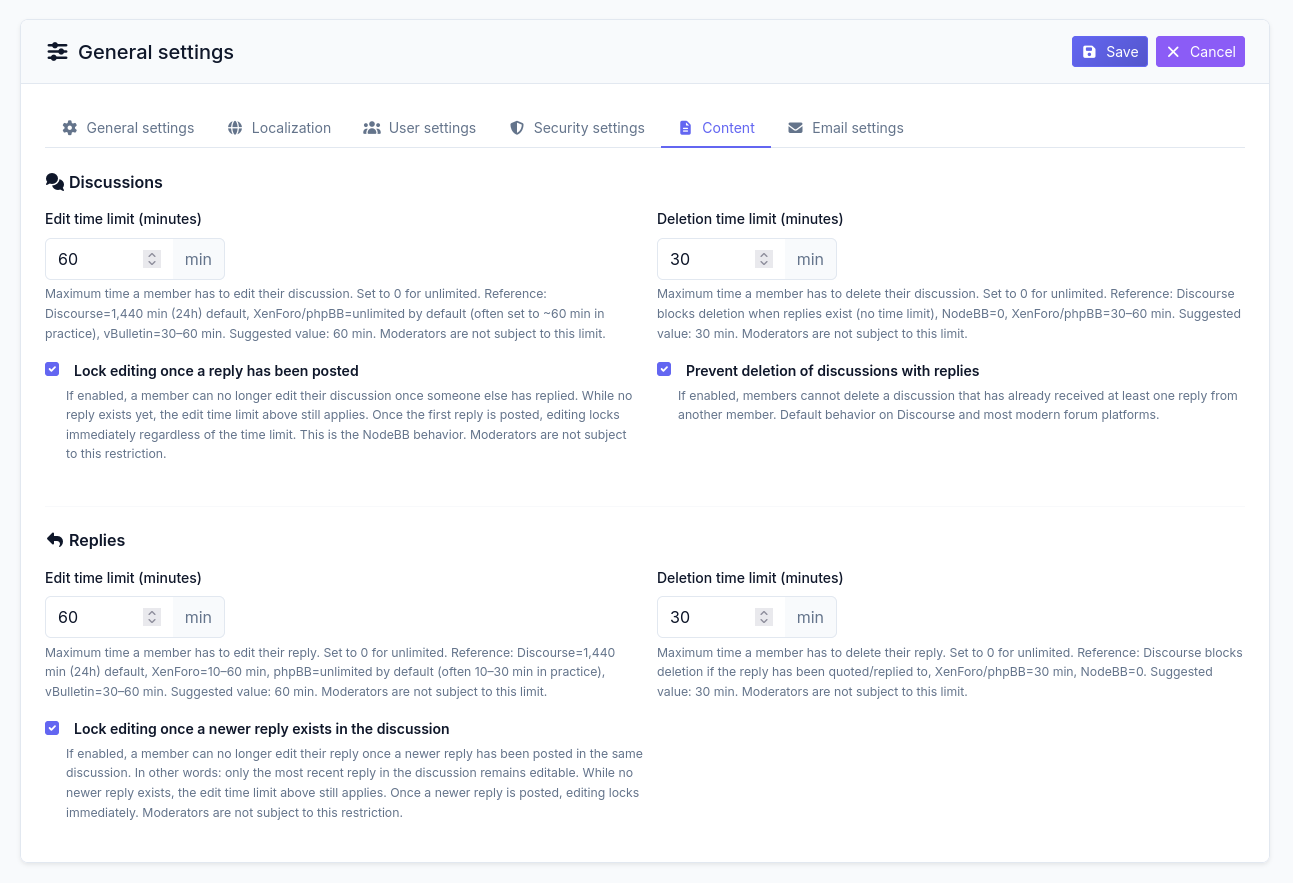
Flatboard 5.6.0 (work in progress) adds proper time limit controls. They're in a new Contenu tab under Admin → Configuration.
What's in there
Seven controls. Four number fields (minutes, 0=unlimited) and three checkboxes:
- Edit window for discussions
- Delete window for discussions
- "Lock editing once a reply has been posted" (discussions)
- "Prevent deleting a discussion that already has replies"
- Edit window for replies
- Delete window for replies
- "Lock editing once a newer reply exists" (replies)
Moderators bypass all of it regardless of what you set. A mod cleaning up spam shouldn't be blocked by a 30-minute window.
The defaults are 60 minutes to edit, 30 minutes to delete. Those numbers come from somewhere specific — the help text shows you what other platforms run.
The reference table
| Platform | Edit window | Notes |
|---|---|---|
| Discourse | 1,440 min (24h) | Default; adjustable per trust level |
| XenForo | Unlimited | Admin sets it manually |
| phpBB | Unlimited | Same — most admins eventually restrict it |
| vBulletin | 30–60 min | Common configured value |
| NodeBB | 0 | Locks on first reply |
NodeBB's zero is strict but honest: once someone else replies, the content isn't only yours anymore. Discourse's 24h window fits a culture of longer-form editing. The 60/30 defaults in Flatboard land in the middle, where most admins end up after a month of tweaking anyway.
The checkboxes on by default
All three ship enabled.
The first two apply NodeBB's reply-lock behavior. Once someone replies to your discussion, editing closes. For replies, only the most recent post in the thread stays editable. The key detail: these work with the time limit, not instead of it. While no reply exists, the minute window applies normally. Once a reply lands, editing locks regardless of what the timer says.
The third blocks deletion. Before 5.6.0, a member could delete a discussion with twenty replies in it. Delete it — and every reply with it. If that thread had a useful troubleshooting exchange, it was just gone.
Once someone else has replied, the discussion stays. You can still edit within your window. You just can't pull it from under everyone who participated. Discourse, phpBB, and most forums that have been around a while work this way.
What members see when the window closes
Not "permission denied." They get a message that tells them specifically the edit or delete window has expired. Small difference in text, real difference in frustration level.
The edit and delete buttons stay visible. The action just doesn't go through.
What settings I'd use
Depends entirely on the community.
Active discussion forum with members I don't personally know: 60 min to edit, 30 to delete, checkboxes on. Enough time to fix a typo or rephrase something clumsy. Not enough to quietly rewrite history after a heated exchange.
Documentation or support forum: I'd push the edit window to 120 minutes, leave deletes unlimited for discussions with no replies (so people can clean up duplicates), and keep the checkboxes on. A member who asked a question and got a detailed answer shouldn't be able to erase the question and strand the answer.
Small private community where I know everyone: everything at zero. You don't need a timer when you already have trust.
One thing to know about the update
If you're on an existing install and just updated to 5.6.0, the new config keys inject automatically on the first request. No migration, no manual config edit. The 60/30 defaults apply immediately unless you go into Admin → Configuration → Contenu and change them.
If the Contenu tab doesn't appear after updating, clear your server-side cache.
Not the flashiest thing in the BASTION release. But for anyone running a community with more than a few dozen active members, it's the kind of control that should have been there from the start.
Edited on May 17, 2026 By Fred .