
Premium Theme


Flatboard Pro Theme - This theme is part of Flatboard Pro edition.
A sophisticated premium theme showcasing all advanced customization possibilities of Flatboard 5. Includes smooth animations, customizable layouts, modern visual effects, flexible page structure and numerous configuration options for an optimal user experience.
✨ Features
🎨 Layout Styles
The theme offers 4 pre-configured layout styles with automatic preset application:
- Default: Balanced and versatile layout
- Centered: Optimized for comfortable reading
- Wide: Immersive full-width experience
- Compact: Dense layout for maximum content visibility
🎭 Visual Effects
- Parallax scrolling: Smooth depth effects on page elements
- Color gradients: Modern gradient backgrounds and accents
- Dynamic shadows: Elevated card designs with depth
- Smooth animations: 4 animation levels (None, Subtle, Normal, High)
- Glass morphism: Modern glassmorphism navbar effect
🎯 Navigation & Interface
- Navbar styles: Default, Glass, Solid, Transparent
- Card styles: Default, Elevated, Bordered, Minimal
- Sticky navigation: Fixed navigation bar on scroll
- Back to top button: Quick return to page top
- Smooth scrolling: Elegant page navigation
- Breadcrumb navigation: Clear hierarchical navigation
📱 Responsive Design
- Fully responsive layout for all devices
- Optimized for mobile, tablet, and desktop
- Flexible sidebar positioning (left or right)
- Adaptive content cards
🎨 Customization Options
- Border radius: 6 levels from 0.5x to 2x
- Avatar shapes: Square, Rounded, or Round (circle)
- Font size: Scalable from 0.8x to 1.5x
- Spacing: Adjustable spacing from 0.8x to 1.5x
- Footer alignment: Centered or container-fluid
🎬 Interactive Features
- User reactions: Emoji reaction picker for posts
- Share buttons: Social media sharing integration
- Notification bell: Animated notification alerts
- User presence indicators: Online status display
- Tooltips: Enhanced Bootstrap and custom tooltips
- Auto-refresh: Automatic notification updates
🎪 Content Sections
- Hero section: Customizable hero banner with HTML support
- Statistics display: Forum stats in Default or Compact mode
- Call-to-action sections: Engagement prompts for visitors
- User avatars & signatures: Personalized user content
- Lazy loading: Optimized image loading for performance
⚙️ Configuration
Access the theme configuration panel from: Admin Panel → Appearance → Themes → Premium → Configure
Layout Options
| Setting | Options | Default | Description |
|---------|---------|---------|-------------|
| Layout Style | Default, Centered, Wide, Compact | Default | Main layout preset (applies coordinated settings) |
| Sidebar Position | Left, Right | Left | Navigation sidebar placement |
| Navbar Style | Default, Glass, Solid, Transparent | Glass | Navigation bar appearance |
| Card Style | Default, Elevated, Bordered, Minimal | Elevated | Content card design |
Visual Effects
| Setting | Options | Default | Description |
|---------|---------|---------|-------------|
| Animation Level | None, Subtle, Normal, High | Normal | Animation intensity control |
| Enable Parallax | Checkbox | ✓ | Parallax scrolling effects |
| Enable Gradients | Checkbox | ✓ | Color gradient backgrounds |
| Enable Shadows | Checkbox | ✓ | Drop shadow effects |
| Border Radius | 0.5x to 2x | 1x | Element corner rounding |
| Avatar Border Radius | Square, Rounded, Round | Square | Avatar shape style |
Typography
| Setting | Options | Default | Description |
|---------|---------|---------|-------------|
| Font Size | 0.8x to 1.5x | 1x | Global font size multiplier |
| Spacing | 0.8x to 1.5x | 1x | Element spacing multiplier |
Content Display
| Setting | Options | Default | Description |
|---------|---------|---------|-------------|
| Show Hero Section | Checkbox | ✓ | Display hero banner on home/forums |
| Hero Custom Content | HTML textarea | Default HTML | Customize hero section content |
| Show Statistics | Checkbox | ✓ | Display forum statistics |
| Stats Display Mode | Default, Compact | Compact | Statistics layout style |
| Show Breadcrumbs | Checkbox | ✓ | Breadcrumb navigation display |
| Show CTA | Checkbox | ✓ | Call-to-action sections |
User Features
| Setting | Options | Default | Description |
|---------|---------|---------|-------------|
| Show Avatars | Checkbox | ✓ | User avatars in posts |
| Show Signatures | Checkbox | ✓ | User signatures in posts |
| Show Share Buttons | Checkbox | ✓ | Social sharing buttons |
| Enable Reactions | Checkbox | ✓ | Emoji reaction picker |
Advanced Features
| Setting | Options | Default | Description |
|---------|---------|---------|-------------|
| Show Notifications Bell | Checkbox | ✓ | Notification indicator in navbar |
| Enable Sticky Navbar | Checkbox | ✓ | Fixed navbar on scroll |
| Enable Back to Top | Checkbox | ✓ | Back to top button |
| Enable Smooth Scroll | Checkbox | ✓ | Smooth page scrolling |
| Enable Lazy Loading | Checkbox | ✓ | Image lazy loading |
| Show User Presence | Checkbox | ✓ | Online status indicators |
| Enable Tooltips | Checkbox | ✓ | Bootstrap & custom tooltips |
| Enable Auto Refresh | Checkbox | ✓ | Auto-refresh notifications |
| Notification Animation | Pulse, Bounce, Shake, Glow, None | Pulse | Badge animation style |
| Footer Centered | Checkbox | ✗ | Center footer content |
🎨 Customization
Custom Hero Section
The theme includes a fully customizable hero section. You can add your own HTML content through the Hero Custom Content field in the theme configuration.
Default hero includes:
- Responsive two-column layout
- Featured image
- Custom icon
- Heading and description
- Call-to-action buttons
Layout Presets
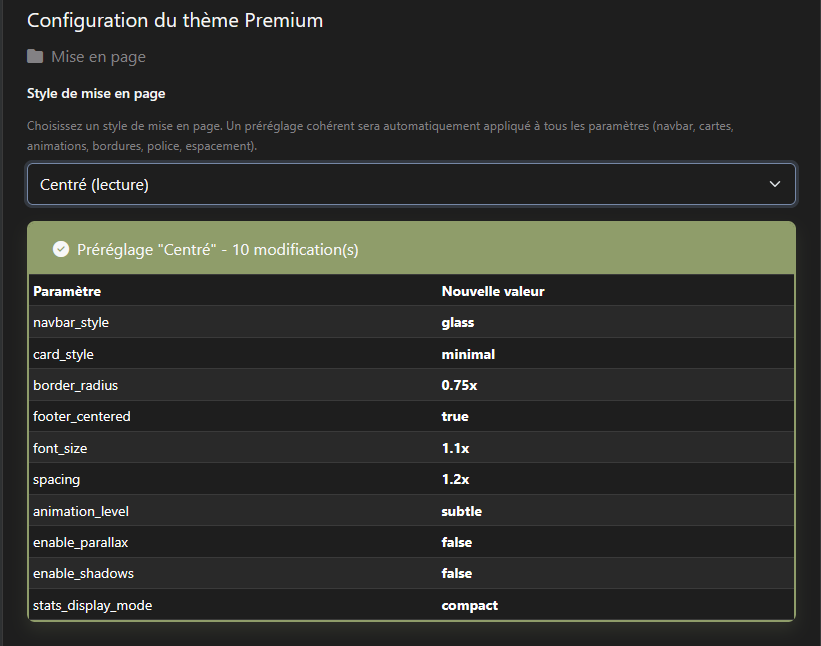
When selecting a Layout Style, the theme automatically applies coordinated settings:
- Default: Balanced animations, standard spacing, glass navbar
- Centered: Reading-optimized, reduced animations, focused layout
- Wide: Immersive experience, enhanced animations, transparent navbar
- Compact: Dense layout, minimal spacing, compact elements
Animation Customization
The theme includes 5 JavaScript modules for enhanced interactivity:
- theme-presets.js: Layout preset coordination
- theme-config.js: Configuration management
- animations.js: Smooth element animations
- parallax.js: Parallax scrolling effects
- ux-enhancements.js: UX improvements and interactions
🎨 Color Scheme
The theme uses a Twilight color palette with full dark mode support:
Light Mode (Twilight Light)
- Primary:
#7587A6(Blue-gray) - Secondary:
#5F5A60(Dark gray) - Success:
#8F9D6A(Olive green) - Danger:
#CF6A4C(Burnt orange) - Warning:
#F9EE98(Pale yellow) - Info:
#AFC4DB(Light blue) - Background:
#F7F7F7(Off-white)
Dark Mode (Twilight Dark)
- Backgrounds: From
#1E1E1Eto#0A0A0A - Text colors: From
#F7F7F7to#838184 - Full contrast optimization for readability
🔧 Technical Details
Browser Compatibility
- Chrome/Edge: Latest 2 versions
- Firefox: Latest 2 versions
- Safari: Latest 2 versions
- Opera: Latest 2 versions
- Mobile browsers: iOS Safari, Chrome Android
Performance Optimizations
- Lazy loading for images
- CSS minification ready
- Optimized animation performance
- Efficient DOM manipulation
- Responsive image loading
🆘 Support
Resources
- Official Website: flatboard.org
- Theme Page: Premium Theme Resource
- Documentation: Flatboard 5 Documentation
- Contact: contact@flatboard.com
Requirements
- Flatboard: Version 5.0 or higher
- PHP: 8.2 or higher
- Modern browser with JavaScript enabled
Troubleshooting
If you encounter issues:
- Clear your browser cache
- Verify theme files are properly uploaded
- Check file permissions (755 for directories, 644 for files)
- Ensure Flatboard 5 is up to date
- Review browser console for JavaScript errors
📄 License
This theme is provided by Flatboard Team. Please refer to the Flatboard license terms.
👥 Credits
Author: Flatboard Team
Version: 5.1.0
Website: flatboard.org
Enjoy your Premium Flatboard experience! 🎉
Edited on Mar 14, 2026 By Fred .
